This is the example which shows how to use events of the mouse (down, move and up) to draw rectangle on the waveform graph.
You can learn how to use event structure, waveform graph property, picture function and bundle/ unboundle vi to implement this example.
這個範例說明如何使用滑鼠的事件,像是按下、移動與釋放去繪製長方形在在圖形控制向上。你可以學習如何使用事件結構、圖形控制的屬性、圖形功能以及bondle/unboundle vi來完成這個範例。
We will share more tutorial videos with people who want to learn LabVIEW. welcome to subscribe this channel.
未來會陸續更新影片,讓想學習LabVIEW的朋友可以看影片學習,歡迎訂閱此頻道。
其他網址/related websites:
https://labview-tech.blogspot.com/
https://fishark.pixnet.net/blog
fishark 發表在 痞客邦 留言(0) 人氣()

Read A0, A1 and A15 analog input and transfer to voltage value. in Range function check if voltage is in the right range.
讀出A0, A1和A15的類比訊號,轉換成電壓訊號,
然後再用inRange函式判斷是否有在正確的範圍內。

fishark 發表在 痞客邦 留言(0) 人氣()


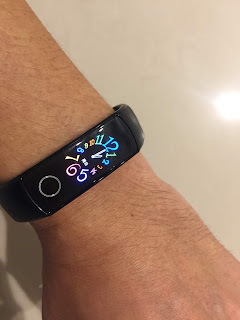
由於榮耀手環 5推出了血氧功能,這是在1000元左右的智慧手環中有血氧功能的,於是我便取得了一支來體驗。
Honor Band 5 launched its first SpO2 detection function with the price lower than 33 USD. I got one to experience some new functions.
榮耀手環5是可以換錶盤的,不過我使用的運動健康App找不到這功能,就僅能用手環內建的錶盤進行選擇。
One of new functions is to change face of  Honor Band 5. But I can not find any face change function in my Health App. I just select faces built in Honor Band 5.
 

fishark 發表在 痞客邦 留言(0) 人氣()

print the report including data and graph to PDF format
將資料和圖表輸出成報告,列印成PDF格式。
未來會陸續更新影片,讓想學習LabVIEW的朋友可以看影片學習,歡迎訂閱此頻道。


其他網址: https://labview-tech.blogspot.com/ https://fishark.pixnet.net/blog
 

fishark 發表在 痞客邦 留言(0) 人氣()

Output data and graph content to HTML report
將資料與圖表內容輸出產生HTML報告
使用LabVIEW中的Report Generation VI來將資料與圖表輸出成HTML報告
未來會陸續更新影片,讓想學習LabVIEW的朋友可以看影片學習,歡迎訂閱此頻道。
其他網址:
https://labview-tech.blogspot.com/
https://fishark.pixnet.net/blog
fishark 發表在 痞客邦 留言(0) 人氣()

Use Customized Menu, Event Structure and Queue to operate signals in different while loop for Producer Consumer Design Pattern.
以下影片是說明如何操作Run-Time Menu來做一格客製化的Menu bar,並在Event Structure中使用Menu操作時的訊號傳遞給Queue,使用Queue來在Event Structure與另一個While Loop做溝通做字串顯示的互動。
未來會陸續更新影片,讓想學習LabVIEW的朋友可以看影片學習,歡迎訂閱此頻道。
 其他網址: https://labview-tech.blogspot.com/ https://fishark.pixnet.net/blog

fishark 發表在 痞客邦 留言(0) 人氣()

Use Run-Time menu to interact with Event Structure
使用Run-Time Menu與事件結構做互動
以下影片是說明如何操作Run-Time Menu來做一格客製化的Menu bar,並在Event Structure中使用Menu操作時的訊號來做字串顯示的互動。
 
未來會陸續更新影片,讓想學習LabVIEW的朋友可以看影片學習,歡迎訂閱此頻道。

fishark 發表在 痞客邦 留言(0) 人氣()

Multi Graph with Timestamp for showing current time 用timestamp呈現多筆資料的圖表顯示
1. X軸使用目前時間的時分秒的方式表示
2. 將多筆資料在一個XY waveform顯示
未來會陸續更新影片,讓想學習LabVIEW的朋友可以看影片學習,歡迎訂閱此頻道。

fishark 發表在 痞客邦 留言(0) 人氣()

由於一段時間沒使用Arduino,於是裝了最新的Arduinon IDE 1.8.10,
沒想到在執行LabVIEW程式時一直出現error 5003,讓我一度以為Mega2560的板子壞了,

fishark 發表在 痞客邦 留言(0) 人氣()


本篇介紹使用Pycharm開發Python程式與用Matplotlib套件繪圖。
1. 建立新專案並新增python檔案matplot.py
2. 在Pycharm中安裝matplotlib套件,打開File-->Setting,找到Project Interpreter,點“+”添加 
搜尋matplotlib後,安裝該套件。
3. 加入程式碼:

fishark 發表在 痞客邦 留言(0) 人氣()


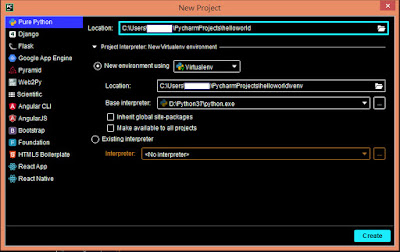
本篇簡單說明如何使用Pycharm來開發Python程式,
以下是建立.py與執行的步驟:
1. File-->New project
2. 在helloworld資料夾右鍵,出現下拉選單,選擇-->New-->Python File
3. 填上檔案名稱
4. 在程式碼中填入print("Hello World!")
5. 在helloworld.py上按右鍵,出現下拉選單,選擇Run 'helloworld'
6. 下方視窗即出現執行結果。
 

fishark 發表在 痞客邦 留言(0) 人氣()


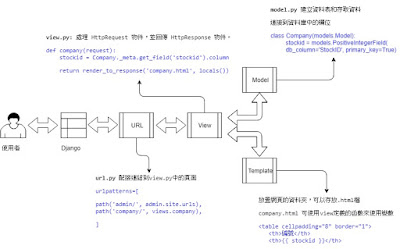
本篇來整理一下Django的MTV框架,了解彼此間的關係與應用,
MTV代表了Model, Template與View,由 Model 負責資料層,View 負責視覺,Controller 負責商業邏輯的部份。
用下圖來說明MTV之間的互動流程,當使用者用瀏覽器與Django寫的網頁進行互動,首先會是跟哪個URL先產生互動,url.py會有urlpatterns來定義互動的網頁/址與對應的函數,如與company/互動,就會對應到view中company函數。
view.py中有def company(request)函數,使用者提出了一個request (HttpRequest),view會負責處理request,並提供response (HttpResponse),例如在資料庫中取得stockid的資料,並response給company.html。
view.py所需要取得的資料是由model.py來處理,model.py有class  Company(models Model) 裡面連結資料庫中的欄位,如Stock_ID,連結了stockid變數,開發者可以使用stockid,而無須寫MySQL語言與資料庫溝通。
Template則是存放.html的資料夾,使用者在company/提出request,經由url.py引導到view.py負責處理的函數,然後response到company.html,例如在company中顯示stockid的資料。
 

fishark 發表在 痞客邦 留言(0) 人氣()

Blog Stats
⚠️

成人內容提醒

本部落格內容僅限年滿十八歲者瀏覽。
若您未滿十八歲,請立即離開。

已滿十八歲者,亦請勿將內容提供給未成年人士。