[若不想看pixnet廣告,請到此連結: https://labview-tech.blogspot.com/2019/02/python-for-loop.html ]
For Loop練習,使用Google colaboratory。
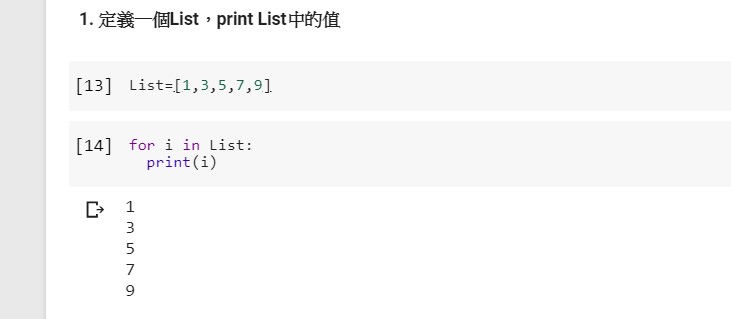
1. 定義一個List,print List中的值

部落格全站分類:數位生活
[若不想看pixnet廣告,請到此連結: https://labview-tech.blogspot.com/2019/02/python-for-loop.html ]
For Loop練習,使用Google colaboratory。
1. 定義一個List,print List中的值
[若不想看Pixnet的廣告,請看: https://labview-tech.blogspot.com/2019/03/python-if.html]
這邊來做幾個Python IF條件的判斷練習
1. if 判斷條件:
執行語句…… else:
執行語句……目前想使用BLED112與LabVIEW BLE Toolkit與BLE M+Arduino作結合,想Read與Write資料,
雖然這個BLE Module與App Inventor 2的資料讀寫,已經證實可行,
但在與BLED112與LabVIEW BLE Toolkit的搭配上卻還有這一些問題,
首先是Characteristic UUID與Service UUID無法被發現:
Error 0 occurred at Client Characteristic Configuration for Service: 0000FFF0-0000-1000-8000-00805f9b34fb and Characteristic 0000FFF1-0000-1000-8000-00805f9b34fb was not found
接下來內容請到我的blogger:
https://labview-tech.blogspot.tw/2018/02/bel-dongle-bled112labview-ble-toolkt.html
由於Pixnet在文章中常會插入廣告,
或是網頁會出現影像的廣告的內容,
我想呈現一些較單純的文章內容呈現,
因此新的文章會發表到下列連結:
https://labview-tech.blogspot.tw/2018/01/ble-bluetooth-low-energy-toolkit-for.html
之前使用過 App inventor開發過BLE App,但實在是有不方便的地方
例如Debug的部分,
最近翔從 LabVIE來實現與BLE的溝通,於是搜尋相關資訊,發現LabVIEW有提供相關的套件,
1. 以下是下載資訊:
Communicate with Bluetooth Low Energy (BLE) Devices in LabVIEW
After I tried Mega2560 and DUE, Mega2560 board can implement the function of analogReference(), but Due didn’t.
Due only has 3.3V analog reference. If you want to change AREF of DUE, external AREF and some hardware modification are required.
我們使用MCP3551來實現RTD的量測,
主要是因為電路簡單,相關的電路可以在Microchip網站查詢,
本文是使用single mode的方式來讀取PT100的Analog數值,並換算成溫度值,
由於網路上的範例並不完整,有時會讀不到PT100的Analog數值,
有時候會在網路上Download一些別人寫好的函式庫與範例,
在執行時會遇到:"WProgram.h: No such file or directory"訊息,
基本上我是在該函式庫的.cpp以及.h中,將原先的"WProgram.h" 改成 "Arduino.h",
下載的範例即可執行,
如果有遇到類似問題,可以參考看看。
Eagle PCB提供入門者不用花昂貴的費用就可以嘗試Layout電路圖與電路板
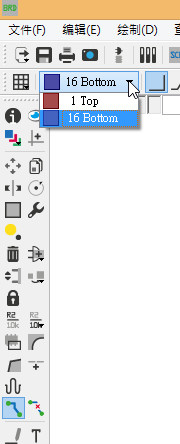
在繪製電路圖時,如果拉線時需要經由Via將上電路板正面的線轉到電路板背面,
只需要圖在層上正反面切換,即可完成,
如下圖:
 網路尋奇 (2) Labview工作室 (17) 嵌入式系統設計 (6) Android程式開發 (3)